Home › Learn › How to write guitar tab
How to write guitar tab
You can write tab in any text editor in five minutes, and it is worth knowing the conventions so other people can read it. For anything longer than a riff, an editor that knows the rhythm, plays the tab back and prints it saves hours. This guide covers both.
Updated October 25, 2026 · by the SimpleNotation team
Writing tab by hand
Start with six lines, high string on top, every line beginning with the string name and a bar line, and fill them with dashes. Use a monospaced font (Courier, Consolas, Menlo, or any code editor) so the columns line up. Then put the fret numbers on the lines, left to right in the order they are played:
Tuning: E A D G B E     Capo 2     ♩ = 92

    Am              C               G               Em
e|--0---------------0---------------3---------------0-----------|
B|--1-------1-------1-------1-------0-------0-------0-------0---|
G|------2---------------0---------------0---------------0-------|
D|--2---------------2---------------0---------------2-----------|
A|--0---------------3-----------------------------------------|
E|----------------------------------3---------------0-----------|
The conventions that make a tab readable:
- Space is time. Keep a fixed number of characters per beat (four dashes per quarter note is common), so a half note takes twice the width of a quarter. Readers will take the timing from the spacing.
- One column, one moment. Numbers played together line up vertically; two-digit frets take two characters, so pad the other strings with an extra dash.
- Bar lines (|) at the end of every bar, and a blank line between systems. Four bars per line fits an 80-character page.
- Header first: tuning if it is not standard, capo, tempo, and the song title and who wrote it.
- Chord names above the column where the chord changes, and section names (Intro, Verse, Chorus) on their own line.
- Techniques between the numbers using the standard letters: h, p, /, \, b, r, ~, x; PM on a line above. See guitar tab symbols.
- Rhythm, if you need it: some writers add a line under the tab with the note values (q for quarter, e for eighth, s for sixteenth), or a row of stems. Most leave it to the recording.
Writing tab in an editor
A tab editor keeps the columns straight for you, knows how long every note is, and plays the result back so you hear your mistakes. In SimpleNotation you type straight onto the tab:
- Choose the instrument. A new score starts with a guitar in standard tuning; the Instruments dialog changes the tuning, adds a capo or switches to bass, ukulele, mandolin or banjo. The tunings guide lists the presets.
- Put the cursor on a string with ↑ and ↓, and type the fret number: 0 to 9, or two digits quickly for 10 to 24. The notation staff above writes the note at the same time.
- Set the length with + for shorter and − for longer, . for a dotted note, / for a triplet; R writes a rest and L ties a note to the one before. Press → to move to the next beat; past the end of the bar, the editor adds beats and bars as you go.
- Add techniques with one key each: H hammer-on or pull-off, S slide, B bend, V vibrato, X dead note, P palm mute, I let ring, Y harmonic.
- Chord names with K, lyrics with W, section names and letters from the Text tab of the ribbon, repeats with [ and ].
- Play it back with Space. Loop a few bars and slow them down with the transport controls to check a tricky passage; the fretboard panel shows each note as it plays.
- Export it as PDF to print, as text tab to paste into a forum or a message, or as a Guitar Pro file; or save it and share the link, which plays in any browser.
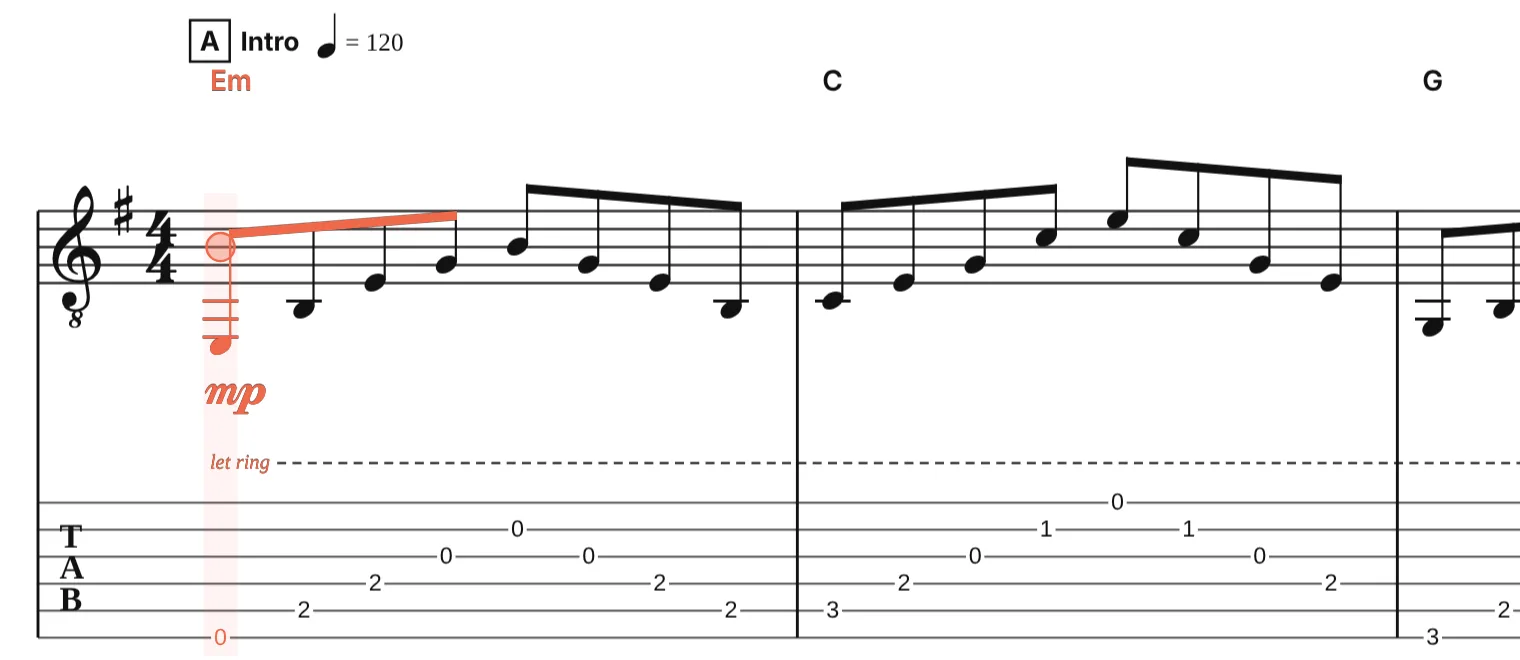
Writing tab from standard notation
If you have the music as notation, you do not need to work out the frets yourself. Type the notes on the staff with the letters A to G and the editor chooses a string and fret for each one, keeping the hand in one position; Alt+↑ or ↓ moves a note to another string when you prefer a different fingering. A MusicXML or MIDI file converts the same way: see sheet music to guitar tab.
A few habits that help
- Write the rhythm, even roughly. A tab with stems can be read without the recording; one without cannot.
- Keep the hand in one position when you choose frets. A note is often playable in three places; pick the one that does not make the hand jump.
- Name the chords above the tab. Readers learn the song faster and can strum along before they learn the picking.
- Mark the tuning and capo at the top, every time, even “standard”.
Questions
Which font should I use for text tab?
A monospaced one: Courier, Consolas, Menlo, or the font in any code editor. Every character is the same width, so the columns stay aligned when someone else opens the file.
How do I show rhythm in text tab?
Space the numbers by time, with a fixed number of dashes per beat, and put a bar line after each bar. For exact rhythm, add note values under the tab or use an editor that writes rhythm stems and a notation staff above the tab.
How do I write a chord in tab?
Stack the fret numbers in one column, one per string, with a dash on strings that are not played. Write the chord name above the column.
Can I write tab on a phone?
Text tab is awkward on a phone keyboard. The SimpleNotation editor runs in a mobile browser with touch input, though a keyboard is much faster for entering notes.
Is it legal to write and share a tab of a song?
A tab of a copyrighted song is a derivative work; sharing it publicly can need the publisher’s permission, which is why large tab sites hold licences. Tab of your own music, of traditional tunes and of public-domain pieces is yours to share.