Home › Notation and tab side by side
Guitar tab and standard notation, side by side
In SimpleNotation every guitar part is written on two linked staves: standard notation above, tab below. Type a note on the staff and it gets a fret; type a fret and it gets a note. Hear it, print it, share it. Free, no download, no account to start.
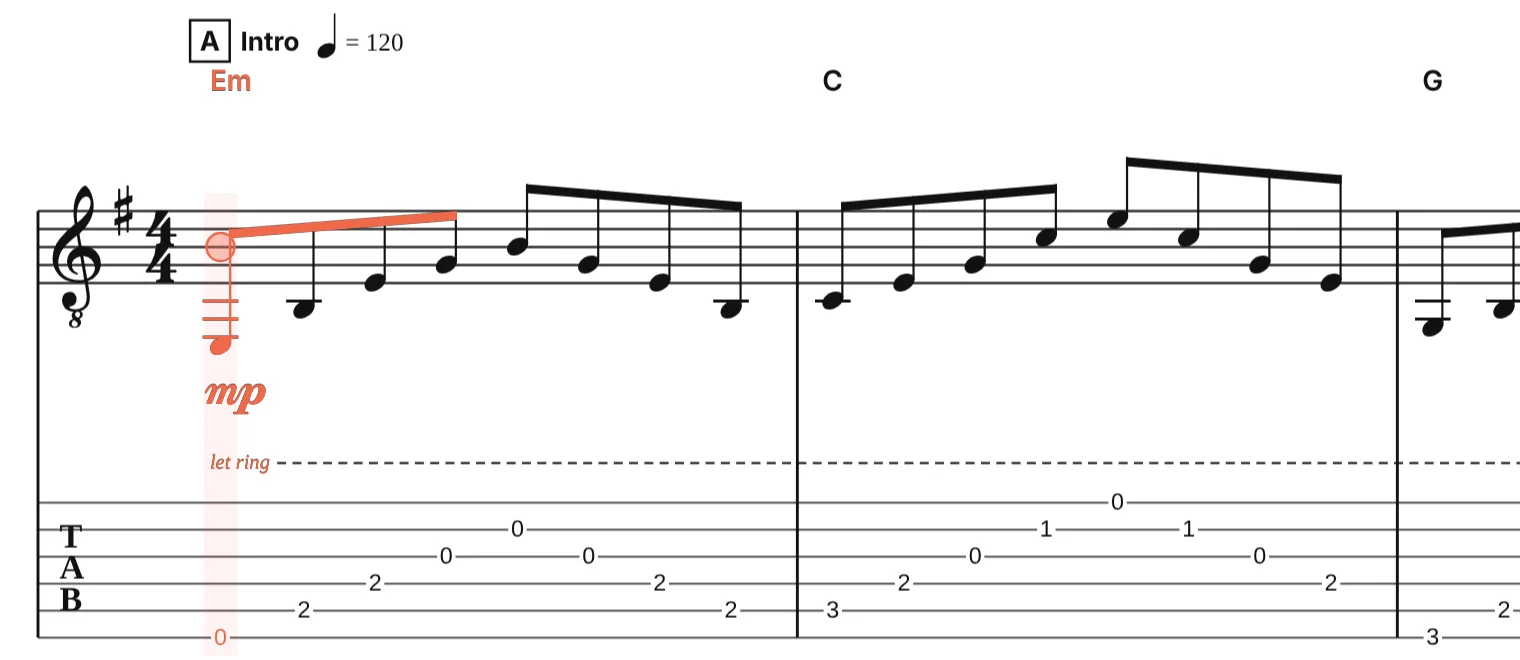
Two views of one part
The staff and the tab are not two copies of the music but two views of the same notes. Each note stores a pitch and, on a fretted instrument, a string and a fret. Change the pitch and the fret is chosen again; move the note to another string and the staff does not change at all. Rhythms, ties, dynamics, chord names and techniques are shared, so neither view can fall out of step with the other.
Enter from either side
- Staff first. Press A to G for the nearest pitch, Shift with a letter to add it to a chord, 2 to 8 to stack an interval. A string and fret are chosen for every note, near the hand’s last position, with chord shapes that can be played.
- Tab first. Press ↑ and ↓ to pick the string and type the fret. The pitch is written on the staff, spelled from the key signature.
- Either way, + and − set the note length, Space plays it back, and the fretboard and piano panels light up the notes as you write and as the score plays.
Read whichever you prefer
Each instrument has a switch for the staff and one for the tab. Keep both for a lesson sheet, hide the tab for a classical edition, or hide the staff for a tab-only printout. The PDF, PNG, MusicXML and Guitar Pro exports follow what is shown, and the MusicXML and Guitar Pro files carry the tab data even when the tab staff is hidden.
Every fretted instrument
Six, seven and twelve-string guitars, four and five-string bass, ukulele, mandolin, banjo, bouzouki, lute, dobro, lap steel and more come with their own tunings and tab. The tuning and capo can be changed at any time; the sounding notes stay and the tab is fretted again.
Files from other programs
A Guitar Pro file arrives with both staves already linked. A MusicXML score from MuseScore, Sibelius or Dorico keeps its tab if it has one and gets tab for its guitar parts if it does not. A MIDI file is written out as notation first, then fretted. Going out, MusicXML and Guitar Pro keep both views.
Convert in one step
Questions
Can I show the tab without the notation, or the other way round?
Yes. Each instrument has a “show standard notation” and a “show tab” switch in its settings. Exports follow what is shown.
Does editing the tab change the notation?
Yes, at once. A fret typed on the tab becomes a pitch on the staff; a note moved to another string keeps its pitch, so the staff stays as it was.
Is it only for guitar?
No. Bass, ukulele, mandolin, banjo and every other fretted instrument in the editor get the same linked staff and tab, with their own tunings. Piano, strings, winds, voices and drums can be in the same score on notation staves.
Is it free?
Yes. Writing, playback, import and export are free, with no watermark on PDFs and no account needed to start.