Home › Sheet music to guitar tab
Convert sheet music to guitar tab
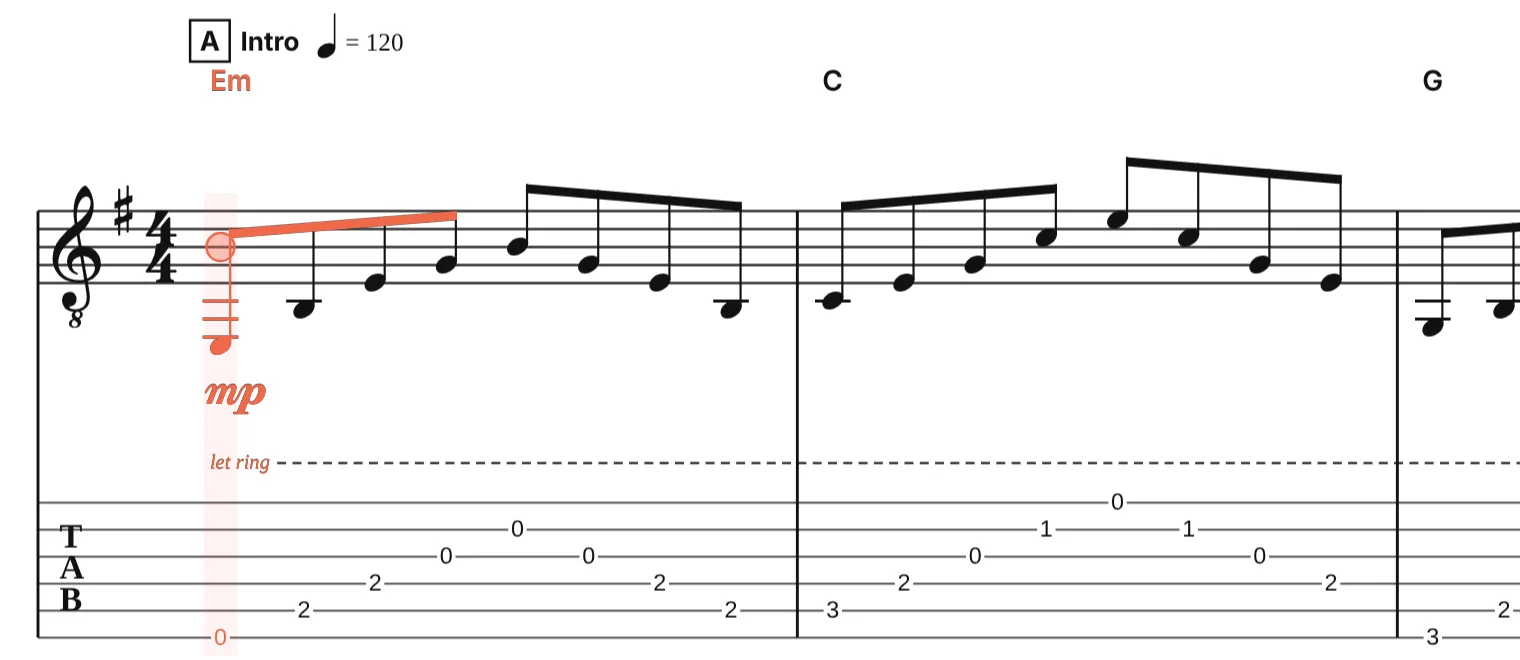
Drop a MusicXML or MIDI file of the sheet music and download it as tab, with a string and fret chosen for every note and the notation kept above it. Or type the notes from the keyboard and watch the tab write itself. Free, in your browser, nothing uploaded.
The converter needs JavaScript. Without it, open the file in the editor and export it from the ⋯ menu.
Three ways in
- A MusicXML file. MuseScore, Sibelius, Dorico, Finale and most score libraries export MusicXML (.musicxml, .xml or .mxl). Drop it above. Guitar and bass parts get tab; the notation stays above it.
- A MIDI file. The notes are turned into readable rhythms first, then fretted. Files made in notation software convert cleanly; recordings need a few rhythms fixed. See MIDI to guitar tab.
- Type it. Open the editor and press A to G for pitches, 2 to 8 to stack intervals into chords, + and − for note lengths. Every note you enter on the staff appears in the tab with a fret. Or open a score and add the tab there.
How the frets are chosen
Every note on a guitar, bass, ukulele or other fretted part gets a string and fret. Chords are given shapes a hand can play, single notes stay near the previous hand position instead of jumping around the neck, and tied notes keep their string. The tuning and the capo of the instrument are taken into account, so a part in drop D or with a capo on the second fret is fretted for that.
No automatic fingering matches a player’s taste everywhere. In the editor, put the cursor on a note and press Alt+↑ or ↓ to move it to another string; the fret follows. Type a fret number straight onto the tab to set a position by hand.
When the part is for piano or voice
A part gets tab when the file says it is a guitar, bass or other fretted instrument, through its name or its MIDI sound. For a melody written for piano, voice or another instrument, open the score in the editor, change the part’s instrument to a guitar in the instrument settings, and the tab appears. Notes below the lowest string stay on the staff without a fret, so you can see what to move up an octave.
What you get out
- PDF: notation with tab underneath, to print or read on a tablet. Hide the notation in the editor for a tab-only page.
- Text tab: plain ASCII tab for a forum, Reddit, Discord or an email.
- Guitar Pro: a .gp file with the tab, to keep editing in Guitar Pro 7 or 8.
- MusicXML: the score with its new tab staff, for MuseScore, Sibelius or Dorico.
The other direction
To turn tab into standard notation, see guitar tab to sheet music. For what the two staves do together in the editor, see notation and tab side by side.
Questions
Can I convert a PDF of sheet music to tab?
Not from the PDF itself: a PDF is a picture of the score and has no notes in it. If the score exists as MusicXML or MIDI, use that. Otherwise type the notes into the editor; with the A to G keys it is quick for a melody.
Does it work for bass, ukulele, mandolin or banjo?
Yes. Every fretted instrument in the editor has its own tuning and gets tab the same way, with the right number of strings.
Can I choose the tuning or add a capo?
Yes. In the editor, open the instrument settings, pick a tuning preset or set each string, and set the capo fret. The tab is fretted again for the new setup; the sounding notes stay the same.
Why are some notes in the tab fretted high up the neck?
The fingering keeps notes near the previous hand position, and a passage that starts high stays high. Move the cursor to the first note of the passage and press Alt with ↑ or ↓ to change its string; the notes after it follow when you re-finger from there.
Is the score uploaded?
No. Files are read and the tab is worked out in your browser. Nothing is sent to our server unless you open the score in the editor and save it.