Home › Learn › Write down a song from a lesson
How to write down a song from a video lesson
A lesson video shows you where the fingers go, and the next day you have forgotten half of it. Writing the song down as you learn it fixes that: you get a page you can print or keep on a tablet, play back at any speed, and come back to in a month. This is the routine, with the editor doing the layout.
Updated October 25, 2026 · by the SimpleNotation team
1. Set up the score like the lesson
Open a new score. Give it the song’s name and the artist in the score details so you can find it again. Then match the instrument: if the teacher says “capo on the second fret” or “drop D”, set that first in the Instruments dialog, because every fret you type is read relative to the capo and the tuning. The tunings guide lists the presets.
2. Time signature, tempo and pickup
Most songs are in 4/4, which is the default. If the teacher counts “one two three, one two three”, change the time signature to 3/4 from the Bars tab of the ribbon. Set a tempo marking roughly where the song sits; you can play it back slower without changing it. If the melody starts before the first downbeat (“and a-one”), mark the first bar as a pickup bar so the bar numbers come out right.
3. Enter the frets, one bar at a time
Pause the video on the first bar. With the cursor on the tab, move to the string with ↑ and ↓ and type the fret number; the notation above fills in. Choose the length with + and − before or after typing it, . for dotted, R for a rest, L to tie to the previous note. Press → for the next beat. When the picking pattern repeats, type one bar and copy it: M copies the beat to the end of the bar, and Ctrl+C and Ctrl+V copy whole bars.
Do not try to get the rhythm perfect on the first pass. Get the frets down in order with roughly the right lengths, then fix the rhythm when you listen back.
4. Chords, sections and techniques
Add the chord name over the first beat of each chord with K; the editor can draw the chord diagram too. Name the sections (Intro, Verse, Chorus) from the Text tab, so you can find your place in a long song. Mark hammer-ons (H), slides (S), bends (B) and palm mutes (P) where the teacher plays them; the symbols guide explains each.
5. Check it by ear
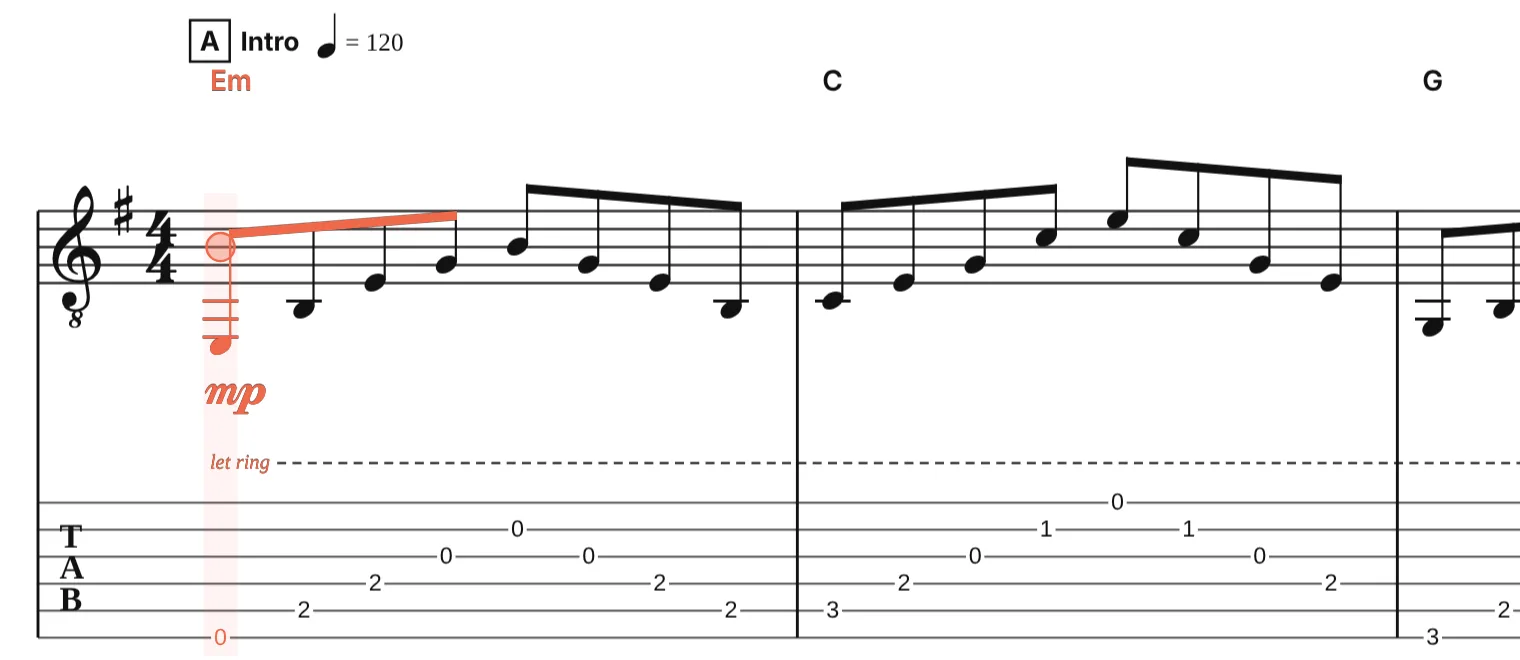
Press Space and listen with the video. Where they differ, the tab is wrong, and the fretboard panel shows exactly which note is playing. Select a few bars and loop them, then use the slower button in the transport to drop the speed without changing the pitch. Fix, listen, repeat. This is also the step where you learn the song.
6. Print it, or keep it on a tablet
Save the score (a guest session is enough; an account lets you find it from other devices). Export a PDF to print or to put in a notes app, or just open the score’s link on the tablet: it plays there too, with the tempo slider, so you can practise along with the recording at half speed. The text tab export is handy for sending to a friend or a forum.
Shortcuts worth knowing for this job
| 0 to 9 | Fret on the current string (type two digits quickly for 10 to 24) |
| ↑ ↓ | Change string |
| ← → | Previous or next beat; past the end adds beats and bars |
| + − . | Shorter, longer, dotted |
| M | Copy this beat to the end of the bar (picking patterns) |
| K | Chord name |
| Space | Play and pause |
| Ctrl+Z | Undo, as many steps as you need |
| Ctrl+K | Search every command by name |
Questions
Do I need to know standard notation to do this?
No. You type fret numbers onto the tab and the notation writes itself above it. Reading it is a bonus that comes with time, because every note on the staff has its fret right underneath.
What if the lesson uses a capo?
Set the capo fret in the Instruments dialog before you enter notes. Fret numbers are then relative to the capo, as the teacher says them, and playback sounds at the right pitch.
How do I slow the playback down?
Use the tempo control in the transport bar at the bottom of the editor. The speed changes, the pitch does not, so you can play along at half speed and work up.
Can I write down a lesson for bass, ukulele or mandolin?
Yes. Pick the instrument when you create the score or change it in the Instruments dialog; the tab gets the right number of strings and tuning.
Can I share what I wrote down?
A saved score has a link; set it to unlisted to share with people you choose. Keep tabs of copyrighted songs private or unlisted; see the terms of use.