Home › Import formats › Guitar Pro
Open Guitar Pro files online
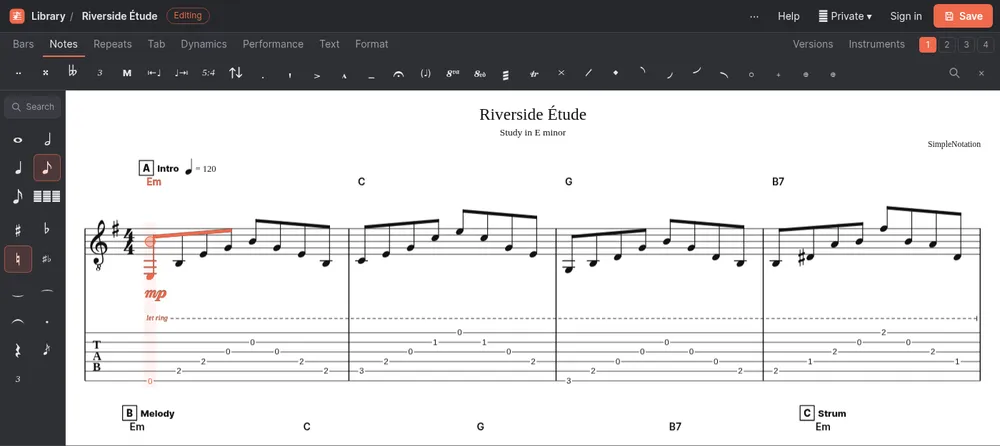
View, play and edit Guitar Pro tabs in your browser, without Guitar Pro. SimpleNotation opens files from every version from Guitar Pro 3 to Guitar Pro 8 and shows the tab with standard notation above it.
Supported files
| Extension | What it is |
|---|---|
| .gp | Guitar Pro 7 and Guitar Pro 8 |
| .gpx | Guitar Pro 6 |
| .gp5 | Guitar Pro 5 |
| .gp4 | Guitar Pro 4 |
| .gp3 | Guitar Pro 3 |
How to open a Guitar Pro file
- On the SimpleNotation home page press Import MusicXML, Guitar Pro or MIDI…, or in the editor open the ⋯ menu and choose Import notation file…
- Pick your .gp, .gpx, .gp5, .gp4, .gp3 file. It is read in your browser; nothing is uploaded.
- The score opens in the editor, ready to play, edit, transpose and export. Press Save to keep it.
What comes through
- Every track with its instrument, tuning (up to 12 strings), capo, volume and pan; drum tracks too
- Strings and frets, up to four voices, ties, tuplets and grace notes
- Hammer-ons and pull-offs, slides, bends, vibrato, natural and artificial harmonics, dead and ghost notes, palm mute, let ring, tapping, slap and pop
- Pick strokes, brushes and arpeggios, tremolo picking and fingering for both hands
- Chord names and diagrams, lyrics, text, dynamics and crescendos
- Time and key signatures, repeats and alternate endings, D.S., D.C. and coda, sections, tempo changes and triplet feel
What changes
- Whammy bar dives and volume or pan changes during the song are not imported; each track keeps its starting volume and pan
- Playback uses SimpleNotation’s own instruments, so it will not sound like Guitar Pro’s RSE sounds
- A track with two staves (a piano, for example) becomes two instruments, one per staff
- Page layout and line breaks are recalculated
Your file stays on your computer
Guitar Pro files are read in your browser with alphaTab, an open-source music notation library. The file is never uploaded. If you want to keep the score online, press Save; you can do that as a guest, without an account.
Convert Guitar Pro to another format
Once the file is open, export it from the ⋯ menu:
- PDF, to print the tab or read it on a tablet
- Text tab, to paste the tab into a forum or a message
- MusicXML, to open it in MuseScore, Sibelius, Dorico or Finale
- Guitar Pro, to save an old .gp5 or .gpx file in the current .gp format
- MP3 audio, to get an audio file to practise along with
- MIDI, to use the notes in a DAW
Questions
Can I open Guitar Pro files without Guitar Pro?
Yes. Import the file into SimpleNotation in any modern browser. You can view the tab and notation, play it back, edit it and export it, for free.
How do I open a GP5 or GPX file?
On the SimpleNotation home page press Import, or in the editor open the ⋯ menu and choose Import notation file, then pick the .gp5 or .gpx file. It opens in the editor straight away.
Is my Guitar Pro file uploaded anywhere?
No. The file is read and converted inside your browser. Nothing is sent to our server unless you choose to save the score.
Why does it sound different from Guitar Pro?
SimpleNotation plays the music with its own synthesized instruments rather than Guitar Pro’s RSE sound banks. The notes, rhythms and techniques are the same.
Can I save my changes as a Guitar Pro file again?
Yes. Export it as a Guitar Pro .gp file, which opens in Guitar Pro 7 and 8.